You spent the weekend setting up a new work laptop. Mneme is on the install list — you’ve used it on your phone and your home mac for months, and you don’t want to be without it for eight hours a day. You install Claude. You add the Mneme connector. A sign-in dialog opens. There are two checkboxes.
The whole post is about that one click — the work checkbox.
Why you want your memory at work too
If you’ve been using Mneme at home, you already know what’s good about it. You don’t re-paste the same project brief into every chat. You ask your assistant “what was the last thing the landlord said about the boiler” and an answer comes back. You snap a photo of a receipt and forget about it; six months later it’s still findable.
That works because Mneme moves with you. The memory belongs to you, not to the chatbot in front of you. Open Claude on the train, ChatGPT in the kitchen, a brand-new assistant your company adopts next quarter — same vault, same answers.
Eight hours a day is a long time to give that up. The work laptop has the same projects you’ve been working on for months, the same product spec, the same release calendar, the same vendor list. If your assistant at home knows all of that, your assistant at work should too. That’s the whole reason you’re installing it.
The thing you don’t want
Here’s the other side of the same coin.
Your home AI knows things that don’t belong on a work computer. The lease. The lab results. The dog’s vet. The Costco receipt. The note you typed three weeks ago about how to handle a difficult conversation with your sister. They are yours — they belong in your vault — but they do not belong in a sentence your work assistant might say out loud while your screen is shared.
This is the part most “AI memory” stories don’t talk about. Memory is good. Memory at the wrong moment is mortifying. The fix is not a smaller vault; it’s a vault that knows which window it’s looking through.
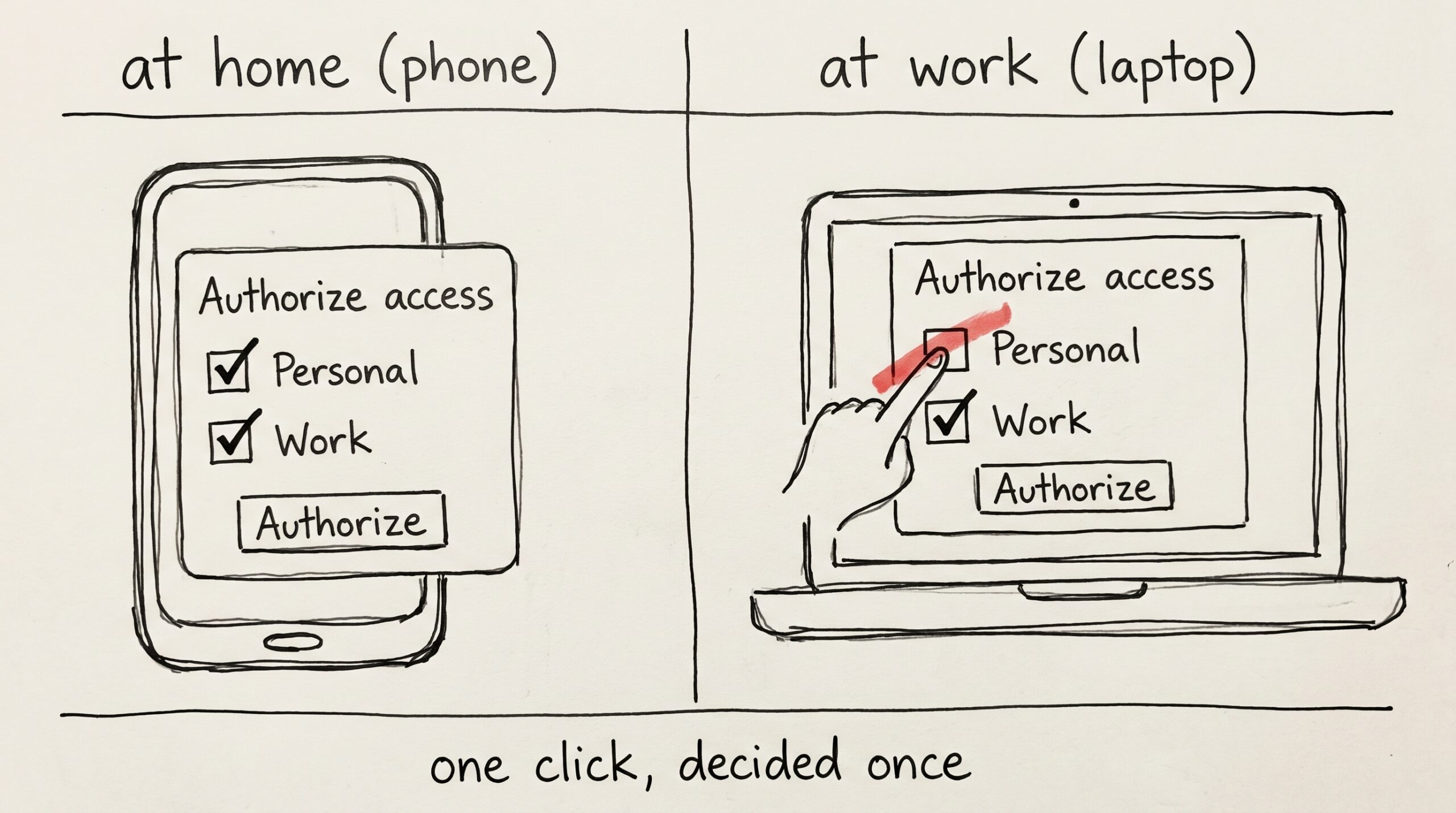
The work checkbox: one screen, one decision
The first time you authorize Mneme on any device — your phone, your home mac, the new work laptop — a sign-in dialog appears. The heading reads Authorize access. Underneath it, one line of hint text:
Pick which contexts this client can read and write. You can change a document’s context later.
Then two checkboxes:
- Personal — Home, mobile, cowork — your full personal vault.
- Work — Work-tagged docs only. Enable on work devices so personal data stays private.
Both are on by default. On your phone and your home laptop you leave them both on, and your assistants there see everything you’ve ever saved. On the work laptop you uncheck Personal. You click Authorize.
That’s the whole feature.
What an unchecked box actually does
It might feel small. It is, in fact, the wall.
A work-only assistant — your work-laptop Claude with Personal unchecked — cannot read your personal notes. Cannot write to them. Cannot search across them. Cannot list them. Cannot move one of them somewhere else. As far as that assistant is concerned, those documents do not exist.
If you’re at your work desk and you ask, “what’s my landlord’s number?”, the work assistant does not pause and refuse. It does not say “I’m not allowed to tell you that.” It just doesn’t know. Same answer it would give for any question whose answer isn’t in the vault it’s been let into.
When the work assistant saves something — a meeting note, a memory about a coworker, a photo of a whiteboard — Mneme files it under work, because that’s the only door this connector has the key to.
This is a little different from how Mneme treats personal-and-work at home. There, the split is a focus filter: you can ask “what’s on my plate at work this week?” and the answer scopes itself, but the choice is yours, in the moment, and you can override it the next sentence. Here, the choice is made for the connector, once, when it asks for permission. The work-laptop assistant cannot opt back into personal halfway through a conversation. The unchecked box is shaped like a door that does not have a handle on the inside.
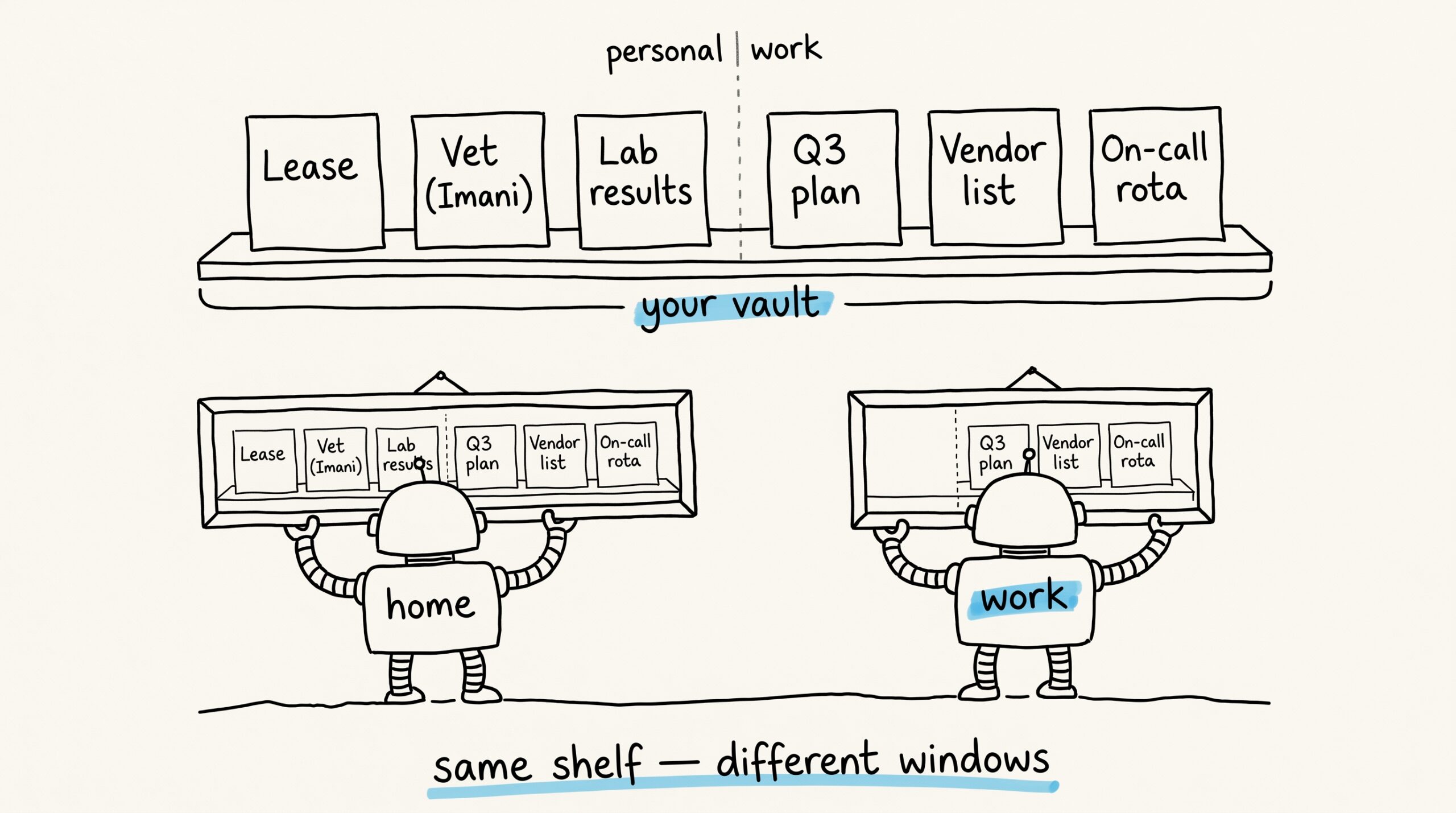
The same vault, lived twice
There is still only one vault. You did not create a second account. There’s no separate billing, no second login, no parallel Mneme.
What changed is the window each device looks through.
At home, your phone and your laptop both authorized Personal and Work. They see the full shelf — the lease, the contract, the project plan, the vendor list, the dog’s vet, the on-call rotation. You can ask anything; if the answer is in the vault, it shows up.
At work, the laptop authorized only Work. It sees the project plan, the vendor list, the on-call rotation. The lease and the dog’s vet do not show up — not because they were deleted, not because they were hidden, but because that connector was never given the key.
Same memory store. Two different windows. Decided by which boxes were checked when each device asked.
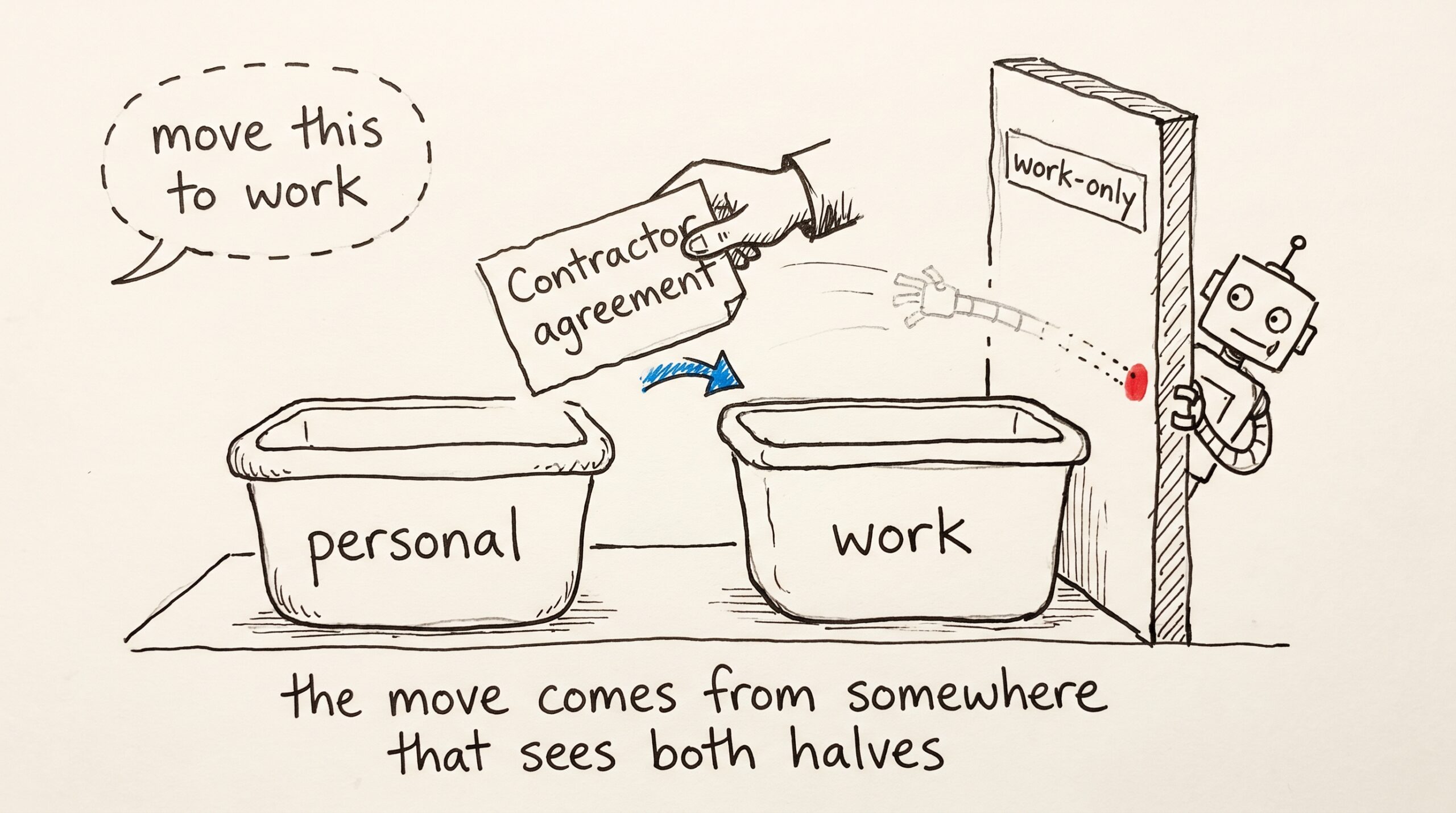
When something needs to cross over
Sometimes a document starts personal and turns out to be work-relevant. The contractor agreement you saved last month is suddenly something you want a vendor meeting to reference. The reverse happens too — a memo you saved at work belongs in your personal life-admin folder.
There are two places to move it from. Open the Your memories or Files Mneme has ingested page in the Mneme app, find the document, and switch its context. Or, sitting in front of an assistant that has both Personal and Work access — your phone, your home laptop — say “move this to work” and it does.
The next time you ask the work assistant about that vendor, the document is there.
One honest note. A work-only assistant — your locked-down work-laptop Claude — cannot pull a personal document into work itself. It cannot see the document, so it cannot reclassify it. That’s not a missing feature; that’s the wall doing the thing you wanted the wall to do. The move has to come from somewhere that can see both halves of the vault, which is you, somewhere with Personal access — your phone, your home mac, the Mneme app in your own browser.
What to do tonight
If you’re already running Mneme on a work computer, the question to ask is: did I uncheck Personal when I authorized it? If you don’t remember, you probably didn’t — both boxes are on by default, and most people click straight through.
If the answer is no, the fix is short. Sign out of the connector on that device, sign back in, and uncheck Personal before you click Authorize. Two seconds of friction once. Eight hours a day, after that, of an assistant that only sees the half of your life it’s supposed to.
If you haven’t installed Mneme yet, you don’t have to do any of this in advance. The screen will be there waiting the first time the connector asks. You’ll know what to click.
Start your vault and pick which window each device looks through.
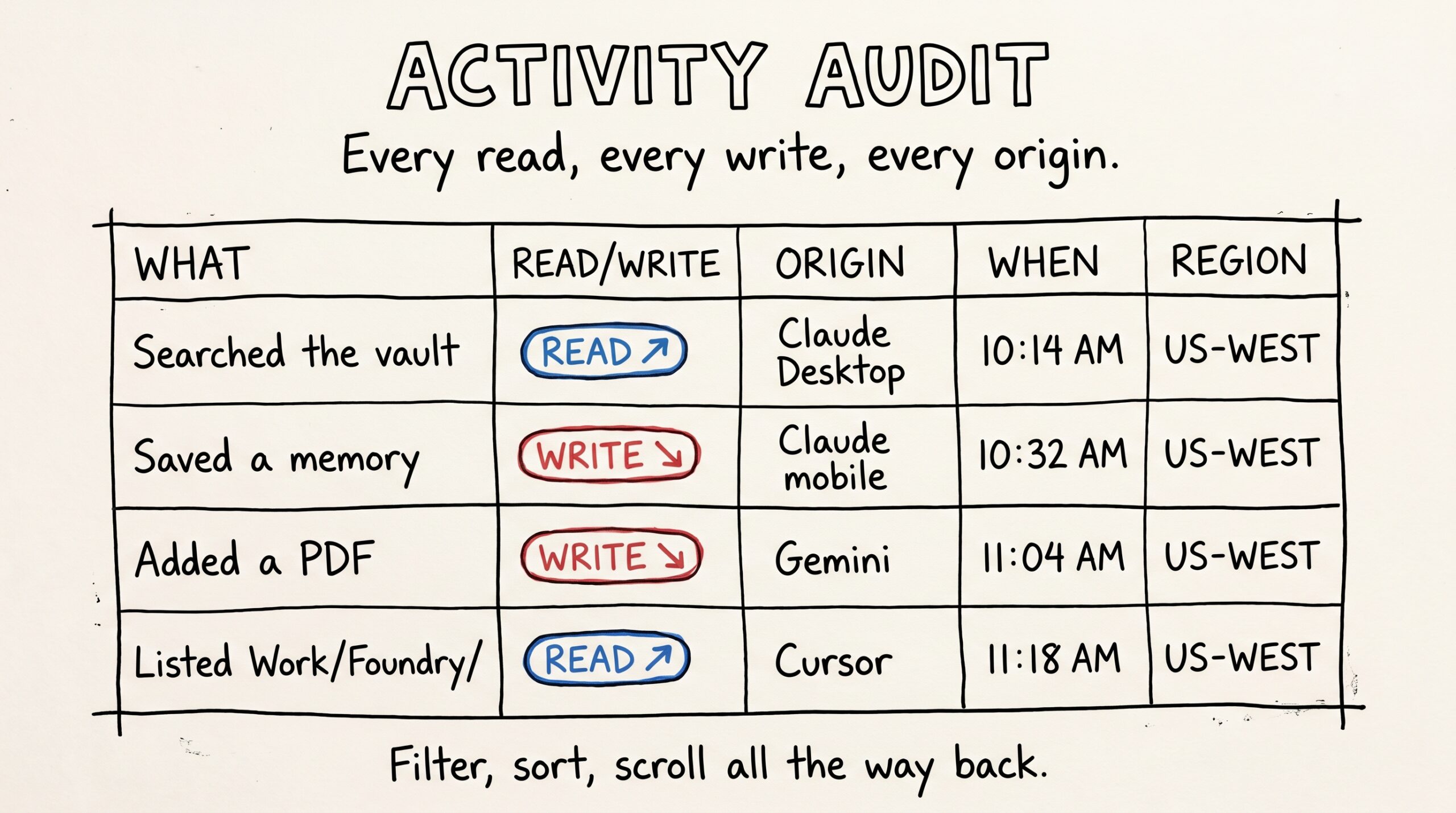
Reading every move your AI makes on your data
You probably can't answer this question off the top of your head: every move your AI makes on your data — what does that look like over a week? Not…
The note that writes itself
Somewhere in your vault there's a note that quietly runs everything: the routing note. It's the page your AI assistants read to learn where things go — receipts here, lab…