Engineering track. This post goes deep on a setup pattern — Claude Desktop personalization plus a global
~/.claude/CLAUDE.md— that makes Mneme an ambient layer instead of a tool you have to remember to invoke. If you’re here for the consumer story of what Mneme is and how recall feels in daily use, the portable-memory post and the Claude Desktop setup walkthrough cover the surface area without the wiring.
One morning I typed “what’s in my Work-Log folder today?” into Claude Desktop. The reply came back as twenty-eight entries, already grouped by project — work I’d done across four different efforts, summarized accurately, with the right tags and timestamps. Project A: 7 entries. Project B: 14. Project C: 5. Project D: 1.
I didn’t write any of those entries. I didn’t ask Claude to log anything. The recap was the first time I’d seen the contents of that folder all week.
Two short blocks of text I’d written weeks earlier made that happen. They sat in two files I rarely open. They fired on every turn, silently. This post is about what they say, why they work, and how to copy the shape for your own MCP server.
The morning that gave it away
The exchange was unremarkable. I asked the question. Claude pulled the folder, sorted by project, returned a tidy list. Each project line had a count and a one-sentence summary of the day’s themes — “front-end heavy session: navigation rail, sidebar tooltips, calendar toggle” for Project B; “two install commits and a TTS suppression fix” for Project C; “OAuth phase split, /simplify pass, gated-note flow fix” for Project A.
Every one of those entries was written by Claude itself, at the end of the turn that produced the work. Each one landed at a path like Work-Log/<project-slug>/<timestamp>.md. I had never typed that path. I had never asked for the log.
What I had done, weeks earlier, was add a paragraph to my global ~/.claude/CLAUDE.md that said at the end of every response that involved real work, log a note to Mneme. That paragraph turned out to be the entire feature.
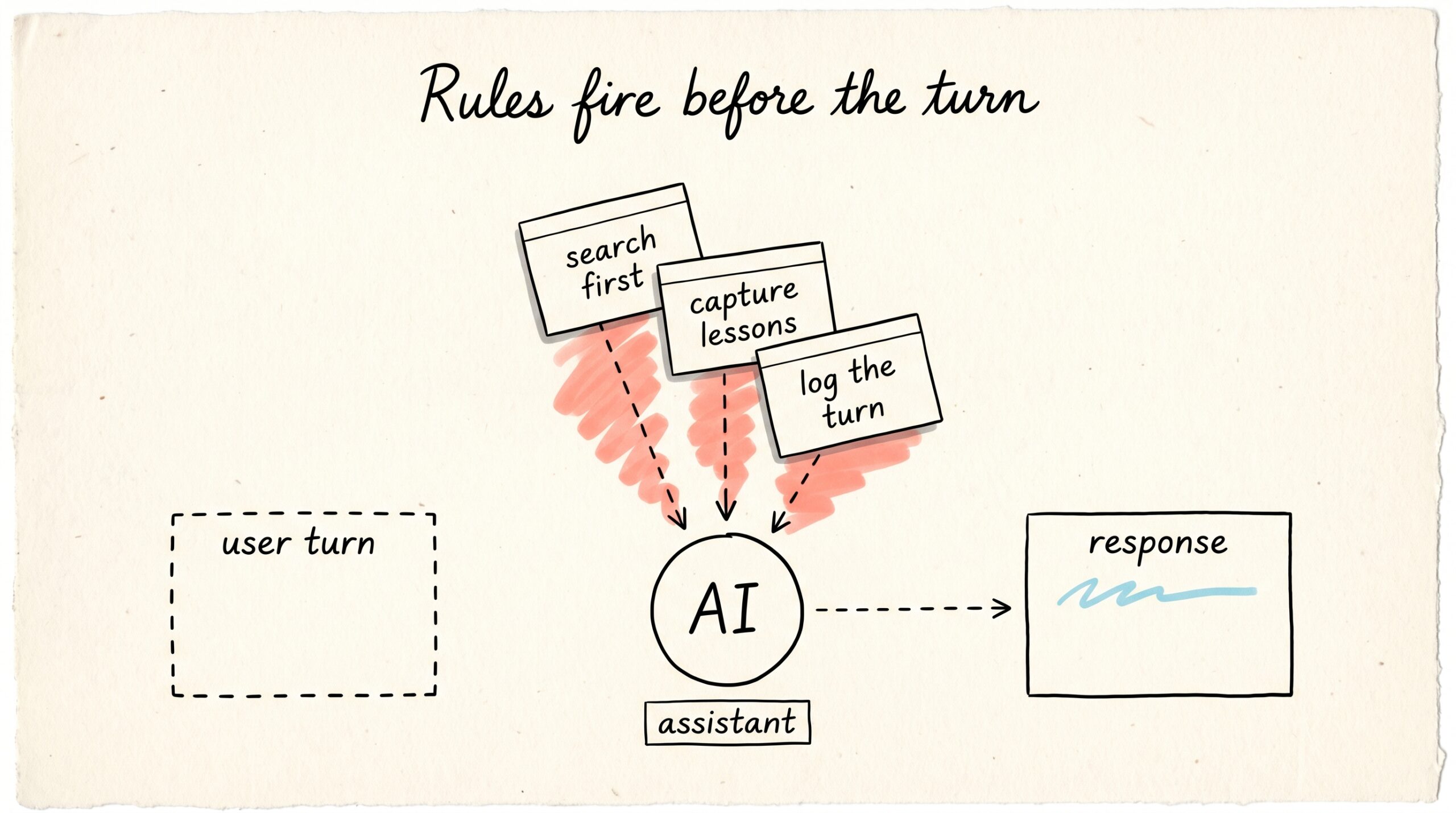
The reveal isn’t that Claude is clever. It’s that Claude treats standing instructions as task context, not as user input. The rule fires when the situation matches, with no further prompting. You write the rule once and you stop thinking about it.
What’s actually wired up
There are two surfaces where you can plant rules like this. They are functionally the same shape and one of them probably already exists in your account.
Claude Desktop personalization is the Personalization field in Settings on claude.ai and the Claude Desktop apps. Whatever you put there rides on every chat. It is not project-scoped, not conversation-scoped, not tied to a specific tool. It’s a paragraph that the model treats as part of its task setup, every turn, on every device signed into your account.
~/.claude/CLAUDE.md is the same idea for Claude Code. It’s a markdown file in your home .claude/ directory that gets injected into every project session you open. It complements the per-project ./CLAUDE.md (which carries codebase-specific rules) — the global file is where you put instructions that should apply no matter which repo you’re in.
Both files are plain text. Both are read by the model before your turn is processed. Neither is memory in the technical sense — they don’t recall, they don’t retrieve, they don’t search. They just sit at the front of the prompt and shape behavior.
The most useful frame for them is standing instructions to a colleague who has read your team handbook. You don’t have to re-explain how the team works every meeting. You explain it once and it shapes every interaction afterwards.
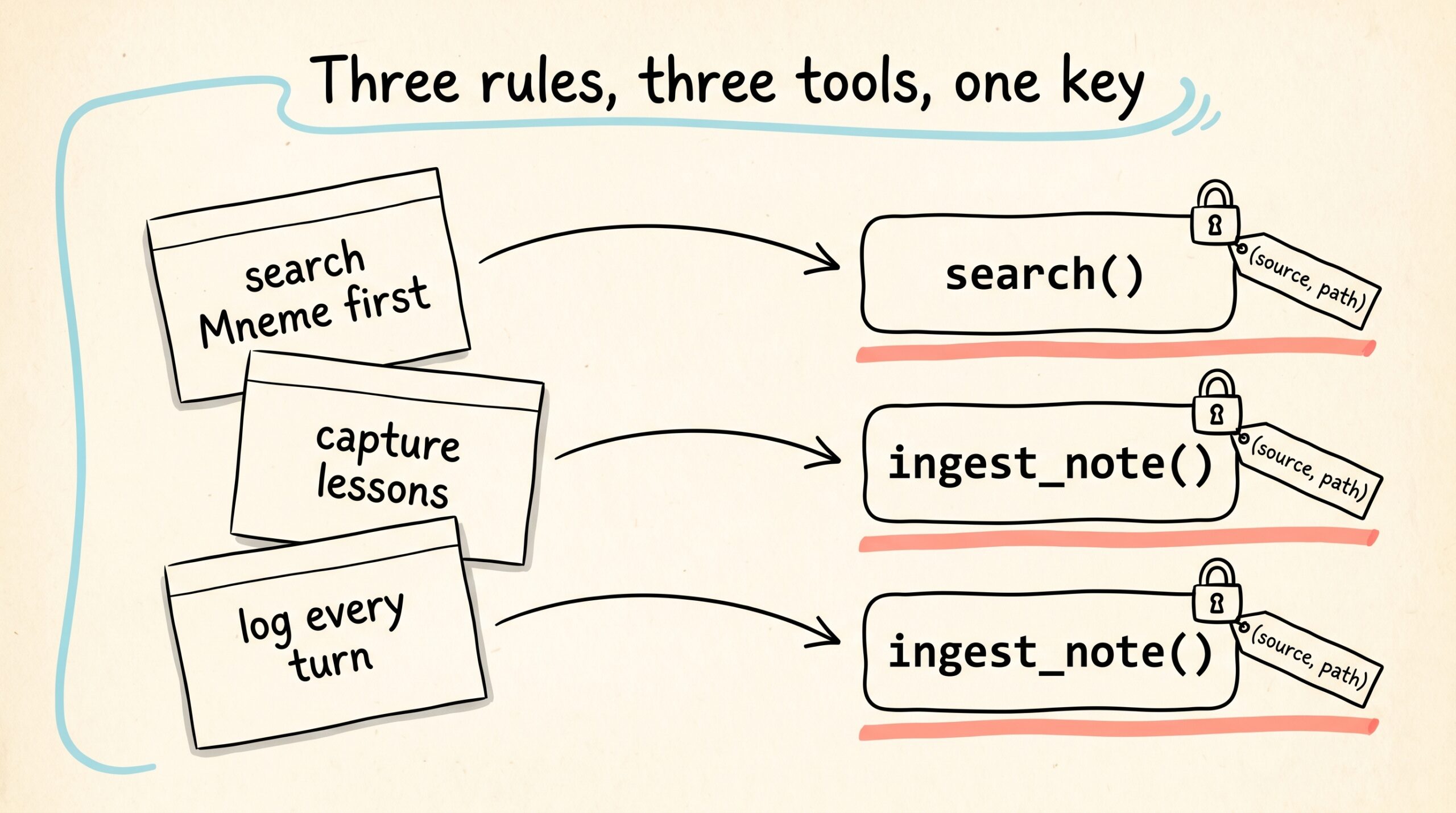
This post is about three specific instructions — the same three I rely on — that turn Mneme from a tool you have to remember to use into a layer your AI uses on its own.
The three rules that do the heavy lifting
Each rule below is paraphrased from my own global file. The wording is not magic; the structure is what matters.
Rule 1 — Search Mneme first
Mneme is your central knowledge base. Before starting substantive work, search Mneme for relevant context using
mcp__claude_ai_Mneme__search. This applies especially to project planning, decisions, prior research, meeting notes, and reference material. When information might exist in Mneme, search first rather than asking for context that’s already documented.
What this rule buys you: you stop re-pasting context. The first thing Claude does, before answering an architecture question or planning a refactor, is run a search against your vault. If the answer is already there — a decision note from three weeks ago, a meeting summary, a prior debugging walkthrough — Claude opens with “per your note from April 12 you decided X — does that still hold?” instead of asking you to summarize the project from scratch.
The reason it works is that the rule names the tool by name. Modern LLM harnesses can have dozens of MCP tools available. Asking the model to “search the vault” gives it a verb without a tool; naming mcp__claude_ai_Mneme__search gives it a verb plus a destination. The two together fire reliably.
Rule 2 — Capture lessons after struggling
When you struggle: if solving a problem took multiple failed attempts or non-obvious debugging, capture the lesson in Mneme before moving on. When you’re stuck: search Mneme first using a semantic query before continuing to guess. After any session where you learned something non-obvious, create or update a note with structured content — Problem, Root cause, Solution, Tags. Notes are idempotent on
(source, path): same pair always upserts the same artifact.
The rule has two halves. The capture half writes a note when something hurt to figure out. The search half makes Claude check for an existing note before re-doing the figuring out a week later. The pair turns every painful debugging session into a permanent shortcut.
The four-section structure (Problem, Root cause, Solution, Tags) isn’t decorative — it’s what makes the notes searchable later. A short title and a list of tags do most of the recall work; the body is for when you actually need the steps.
The idempotency key matters more than it looks. Because notes upsert on (source, path), you can re-run this rule on the same problem ten times across ten sessions and end up with one accurate note, not ten near-duplicates. Without that key, you’d be polluting the corpus by Tuesday.
Rule 3 — Auto-log every substantive turn
At the end of every response that involved real work — code changes, non-trivial tool use, research, debugging — call
mcp__claude_ai_Mneme__ingest_noteonce to log the turn. Path:Work-Log/<project-slug>/<YYYY-MM-DD-HH-MM-SS>.md. Skip on pure conversational replies, when the user says “no log”, or when the turn made zero substantive tool calls.
This is the rule that produced the twenty-eight entries. It runs at the end of substantive turns, in parallel with the final user-facing response, and writes a one-paragraph past-tense summary plus a metadata table — project, date, files touched, tool calls. By the time you read the assistant’s reply, the note is already on its way to the vault.
The skip conditions are doing real work here. Without them, Claude would log “what time is it?” and “thanks!” alongside actual work, and the morning recap would be unreadable. Listing the don’t-log cases out loud — pure chit-chat, single-shot questions, explicit user opt-outs — keeps the signal-to-noise ratio honest.
Why personalization beats slash commands here
Slash commands and tool calls require the user to remember to invoke them. “Hey, log this to Mneme” is a thing you have to remember to type. “Search Mneme before answering” is a thing you have to remember to ask.
Personalization rules fire before the user turn even starts being processed. They are predictive context-loading instructions, not commands. They tell the model what to do given the situation, not what to do now.
The model is good at this. Good enough that you can write a sentence like “if the user mentions an error you haven’t seen this session, search Mneme first using a semantic query describing the problem” and watch it actually happen, turn after turn, without your involvement.
The catch is that this only works because Mneme exposes a stable, named MCP surface. The tool IDs in the rules — mcp__claude_ai_Mneme__search, mcp__claude_ai_Mneme__ingest_note, mcp__claude_ai_Mneme__save_memory — have to keep meaning what they meant when you wrote the rule. If a tool gets renamed, your standing instruction quietly stops firing. (More on that in Where this falls short.)
Patterns that translate to other tools
The same shape works for any MCP server you want to make ambient. Three patterns cover most of what you’ll want to do.
Surface-on-startup. At the start of any substantive session, list open items from a known inbox path and mention them in the first reply. Useful for any tool that produces work for you to acknowledge — alerts, queued recommendations, pending reviews. The rule is one paragraph: “at session start, list recent items under <server>/Inbox/ filtered to status: open. If any exist, mention them at the top of your reply, one line per item.”
Capture-on-confusion. After N failed attempts at a problem, log a troubleshooting note with the standard four sections (Problem, Root cause, Solution, Tags) and an idempotent path. Same structure as Rule 2 above; pointed at whatever knowledge base you keep.
Auto-log-the-turn. At the end of substantive turns, write a one-paragraph past-tense summary to a known path. Same structure as Rule 3; works for any append-only journal.
The trick across all three is the same: idempotent write keys, named tool calls, explicit skip conditions. Without idempotent keys you accumulate duplicates. Without named tool calls the model picks the wrong tool. Without skip conditions the model over-fires and the noise drowns the signal. Get those three right and the rule becomes a load-bearing piece of your workflow that you rarely have to think about.
Where this falls short
A few honest limits.
Drift. When the MCP surface changes — a tool gets renamed, a parameter signature shifts — your rules stale silently. The behavior degrades but doesn’t error out, so you only notice when you realize Claude stopped surfacing a thing it used to. The fix is to re-read your global file every few months and check that the tool names still match what’s published.
Over-logging. If your skip conditions are weak, the model writes notes for trivial chats and your corpus fills with noise. Watch the work-log folder for a week after you turn this on. If you see entries that shouldn’t be there, tighten the skip clause until they stop appearing.
Cross-harness duplication. Claude Desktop personalization and ~/.claude/CLAUDE.md are two separate files you have to keep in sync. If you change one, change the other — or accept that the harnesses will diverge. One day the surfaces may consolidate; today they don’t.
Not a substitute for tool design. If your MCP tools are awkwardly named or undocumented, no personalization prompt rescues them. The rules amplify a good surface; they can’t compensate for a bad one.
What to try
The smallest first step is one rule. Pick the one closest to a habit you already wish you had — most people start with the work-log auto-ingest because the payoff is concrete and immediate.
Open Claude Desktop → Settings → Personalization, or your ~/.claude/CLAUDE.md, and paste:
At the end of every response that involved real work — code changes,
non-trivial tool use, research, debugging — call mcp__claude_ai_Mneme__ingest_note
once to log the turn. Path: Work-Log/<project-slug>/<YYYY-MM-DD-HH-MM-SS>.md.
Skip on pure conversational replies, single-shot questions with no personal
context, or when the user says "no log".
Use Mneme for a week. Pull up the Work-Log folder on Friday and see what came back. If the recap reads like a real summary of the week, add the search-first rule. If you’ve found yourself debugging the same kind of problem twice, add the capture-on-confusion rule.
Mneme remembers what you tell it to remember. The two-prompt setup just means you don’t have to remember to tell it.
The Muses remembered everything. Now your AI can too.
‘What did I write about that contractor last August?’ — actually getting the answer
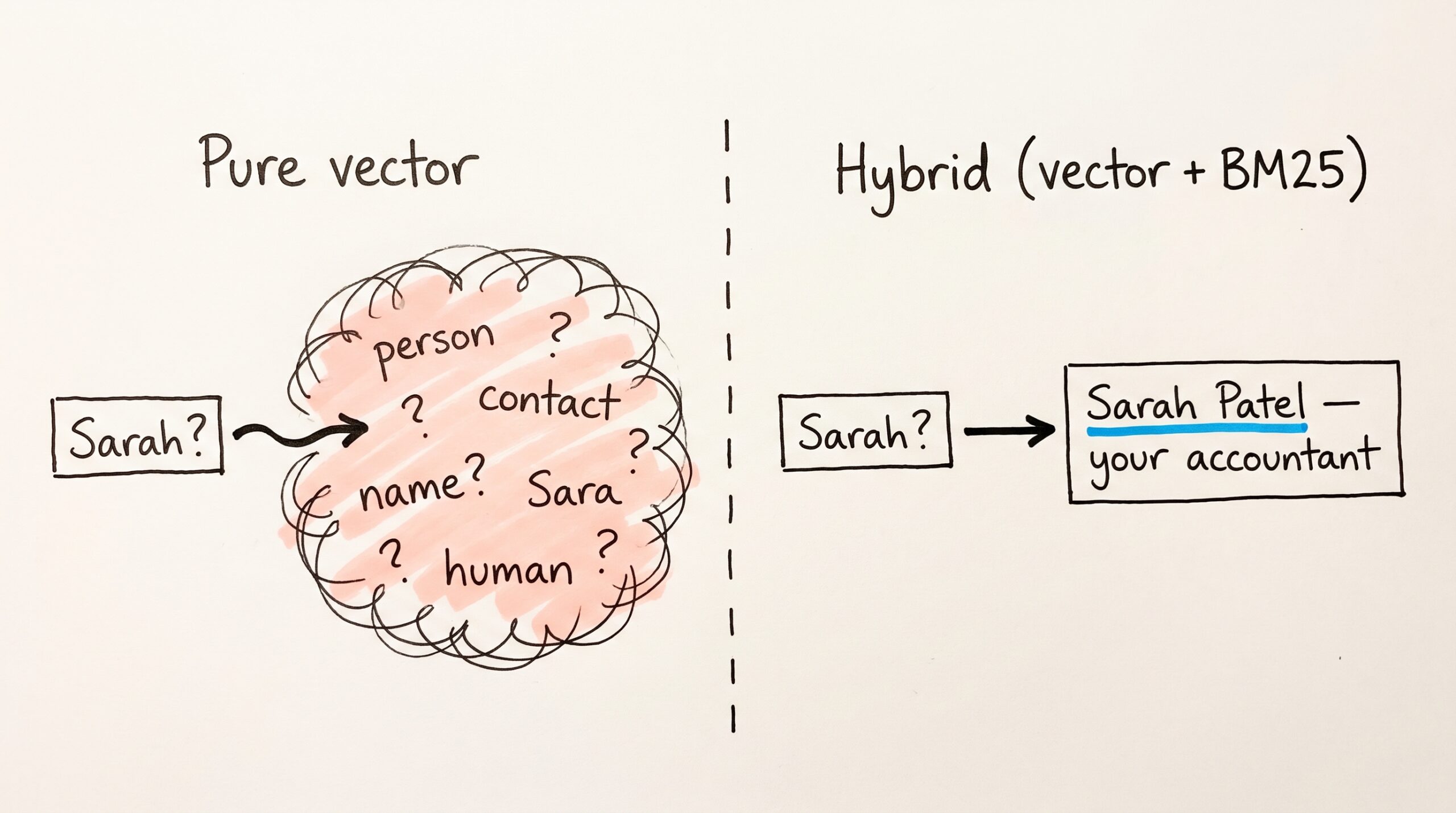
Engineering track. This post goes deep on Mneme's recall pipeline — vector retrieval, BM25, Reciprocal Rank Fusion, provenance metadata. If you're here for the consumer story of how recall feels…
The links you never added
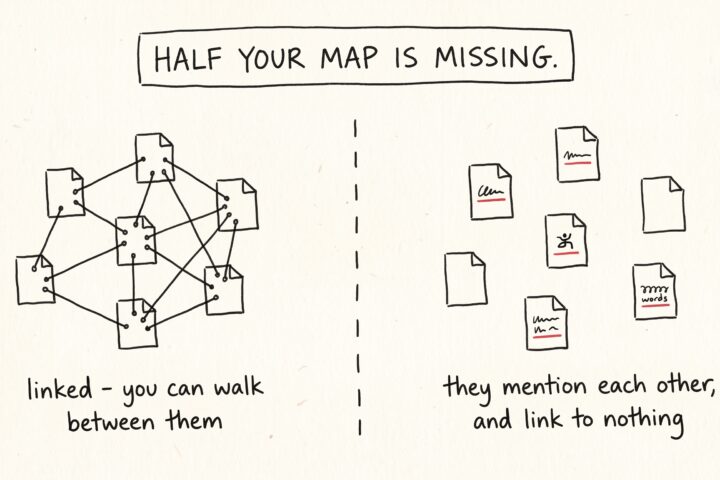
Open any note in your vault and read it the way a stranger would. It's full of references. A meeting note mentions a project. A recipe mentions the dinner party…